

I’ve been using Claude Code for a few weeks and I wish I had started earlier. Coding with Claude Code became much more fun, and this is just scratching the surface of what it can do and the range of complex problems it can solve.
So I thought it’d be useful to write a “Claude Code 101” post where I’ll cover what Claude Code is, the agentic loop, and practical tips for getting started.

What is Claude Code?
Claude Code is a terminal-based agentic tool that interacts with your local filesystem to plan, write, and debug code (plus more features that we’ll talk about below). It was internally released in Nov ‘24, research preview in Feb ‘25, and then GA in May ‘25.
From the official docs:
Claude Code is an AI-powered coding assistant that helps you build features, fix bugs, and automate development tasks. It understands your entire codebase and can work across multiple files and tools to get things done.
In practice: you open Claude Code inside a project folder, give it a task, and it works through your codebase: reading files, coding, testing, and refining. That’s it.
Anthropic built its reputation on high-performance models (Sonnet & Opus). With Claude Code’s bare-bones terminal experience, they’re creating a possible future where IDEs might not be necessary. At least that’s what Boris Cherny, creator of Claude Code, predicts.
Boris recently sat down with Y Combinator to talk about his journey of building Claude Code. Highly recommend watching.
What makes Claude Code interesting
What makes Claude Code interesting (aside from building apps fast), is it removes the barrier to entry for building software and fundamentally changes our role as software engineers.
Boris predicts a future where software engineers are product builders (not backend/frontend engineers), given how easy it is to switch from one tech stack to another with Claude Code.
For example, iOS engineers don’t have to be locked into the iOS stack for building apps, they can jump from one tech stack to another using Claude Code as a coworker (or team of coworkers!).
The real value of Claude Code comes from subagents. You can run a team of agents — separate Claude instances — working in parallel on different parts of your codebase without an IDE (though I use them within VS Code). And the level of complexity Claude handles when debugging and implementing solutions is fascinating and keeps improving with each new model.
At the time of writing, Anthropic’s latest models are Sonnet 4.6 and Opus 4.6.
How Claude Code works
Claude Code operates on an agentic loop. When you give it a task, it works through three phases:
Gather context: searches your codebase and reads relevant files.
Take action: edits files, runs commands, generates code.
Verify results: runs tests, checks compilation, reviews output.
These phases repeat in the loop until the task is complete.
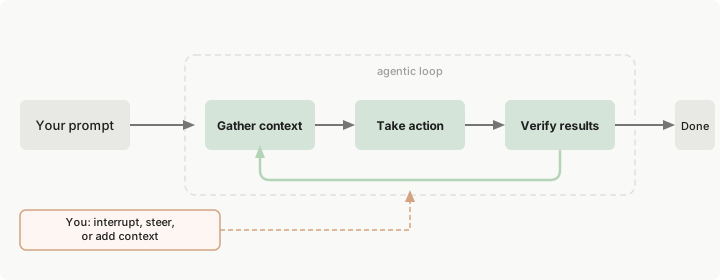
This works great. However, as context accumulates over longer sessions the output quality starts to degrade (usually ~150k tokens) and you’ll notice the model getting “dumber” at making decisions. A good practice would be to track the current context window and use /compact to summarise older context, or start a new Claude session.
For more details: https://code.claude.com/docs/en/how-claude-code-works
Core building blocks
Claude Code has four core building blocks:
CLAUDE.md: A markdown file that tells Claude about your codebase (coding standards, repo structure, architectural decisions). This is persisted context so new Claude sessions can load this into memory.
Skill: A set of instructions or repeatable workflows (e.g., /code-review). A skill is a markdown file that can be used globally (~/.claude/skills/<skill>.md) or at the project level (.claude/skills/<skill>.md).
Subagent: Separate Claude instances for isolated execution. The key advantage is context isolation. Each agent can work on a specific task in parallel without interfering with each other’s context. Read more about subagents here.
Fun fact: Anthropic engineers once asked 16 Claude agents to build a C compiler.
MCPs: Connectors to external systems and data sources. You can instruct Claude to read your docs, query databases, or access GitHub through an MCP. The more tools you can provide to Claude, the more you can automate. Be careful of giving too much access though!
My first app: Personal dashboard
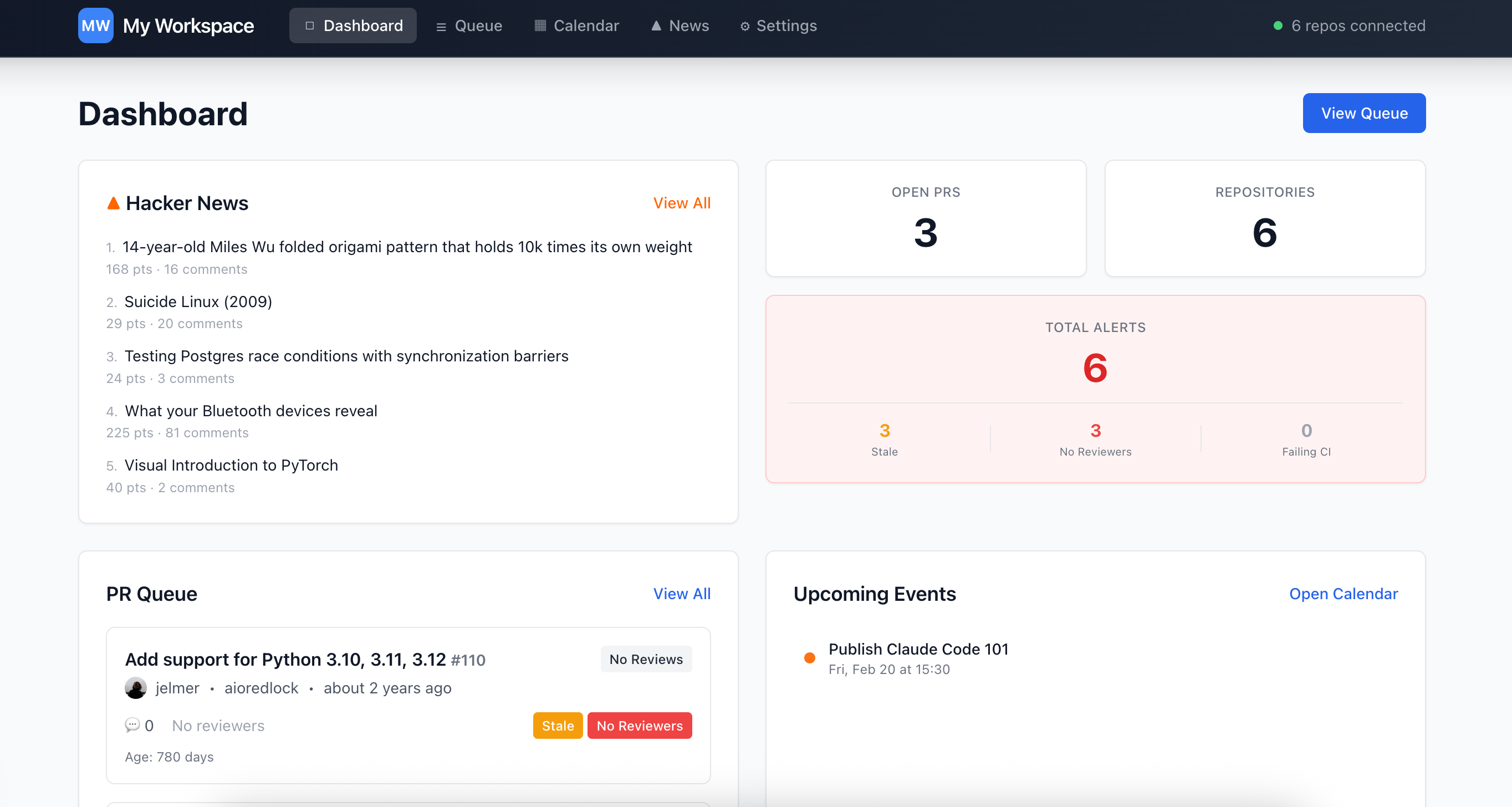
The first app I built was a personal dashboard: local calendar, GitHub PRs, and Hacker News in one view. I described the idea to Claude and steered it with a few follow-up prompts. In <30 minutes, I had a working web app without writing a single line of code. What surprised me wasn’t just the speed, but how Claude planned the work, implemented the tasks, tested its output, and improved.
The agent scaffolded the repo, wrote its own CLAUDE.md to persist context, and kept refining the UI until it looked right.
🔗 Link to the repo: shehab-as/code-review-dashboard
Tips for getting started
1. Use /init when working on new projects
It tells Claude to analyse your repo structure, dependencies, and conventions. It then writes a CLAUDE.md file that persists context across sessions. Without it, Claude has no memory of your project structure and you’ll spend the first few messages re-explaining your codebase every session.
2. Context is gold, keep it under 150k tokens
When you’re close to 100k-150k context window, Claude Code starts to forget earlier decisions and make silly mistakes. It doesn’t warn you when this happens. Use /compact to summarise older context, or start a new session.
🌟 Pro tip: Monitor context health with a “canary keyword”.
At the start of a session, share a memorable detail and check if Claude remembers it later. If it doesn’t, then you have a bloated context window.
You: "Remember this: my favourite coffee is mocha"
[...long coding session with multiple file edits...]
You: "What's my favourite coffee?"
Claude: "I don't see that information in our conversation"
→ Time to start a new session.
3. Keep CLAUDE.md files short
CLAUDE.md is like the onboarding doc for a new engineer working on your project. It doesn’t require a specific structure, but the general advice is to keep it short and straightforward. My CLAUDE.md files usually have: folder structure, coding conventions, available tools, and architecture highlights.
You can version it on the repo and share it publicly (.claude/). It doesn’t have to be a static file. Revise it as you go.
Here’s a guide on writing a good CLAUDE.md file
While Anthropic does not have an official recommendation on how long your
CLAUDE.mdfile should be, general consensus is that < 300 lines is best, and shorter is even better.
4. Prompt like you’re communicating to an engineer
Avoid vague prompts like “fix this” or “make this better”. Be specific with examples as if you’re talking to one of your engineers. For example,
❌ Fix this bug
✅ There is a memory leak in <module> that causes OOM crashes when handling </api> requests. Check the <class> logic and find the root cause. Ask me clarification questions before implementing a solution.
5. Build Skills for repeatable workflows
A Skill can be a simple markdown file or a folder that looks like this:
code-review/
SKILL.md (required): Instructions in Markdown with YAML
scripts/ (optional): Executable code (Python, Bash, etc.)
references/ (optional): Docs, style guides
assets/ (optional): Templates
This could also be writing tests, generating changelogs, or scaffolding new services. Experiment and see what works best for you. See Anthropic’s guide for building skills.
6. Connect Claude with MCPs
The GitHub MCP is the easiest to start with. Allow Claude to read your PRs and issues for gathering more context before taking actions.
Explore available MCPs in the awesome-mcps repo and play around with it.
Cheat Sheet
Finally, here’s a list of common commands you’ll need in a Claude session.
/init→ Run this once per project. It analyses your codebase structure, dependencies, and creates a CLAUDE.md file that persists context across sessions./plan→ Enable plan mode. Claude proposes a detailed implementation plan before taking action. Use this for designing complex features or architectural changes./memory→ Views project memory (./CLAUDE.md) or user memory (~/.claude/CLAUDE.md). Edit these files directly to guide Claude’s behaviour, or ask it to update it if you want to persist context./context→ Provides a visual representation of the current context. Use this to debug why Claude might be missing something or to reduce token usage./compact→ Runs context compaction to free up the context window space./model→ Switches between Claude models during the session./resume [session-name]→ Resumes previous sessions./skills→ Lists available skills or create new ones./agents→ Creates or manages subagents (isolated Claude instances)./mcp→ Manages MCP servers at project-level (.mcp.json) or globally (~/.claude/mcp.json)./permissions→ Manages the allow & deny tool permissions.
Wrap up
So far this is scratching the surface of what Claude Code can do. I highly recommend checking it out. Onboard it on your projects, see where it fits into your existing workflows, and try running multiple subagents. I’m still in explore mode and I plan to share example capabilities in the future (probably a Claude Code 201 post?).
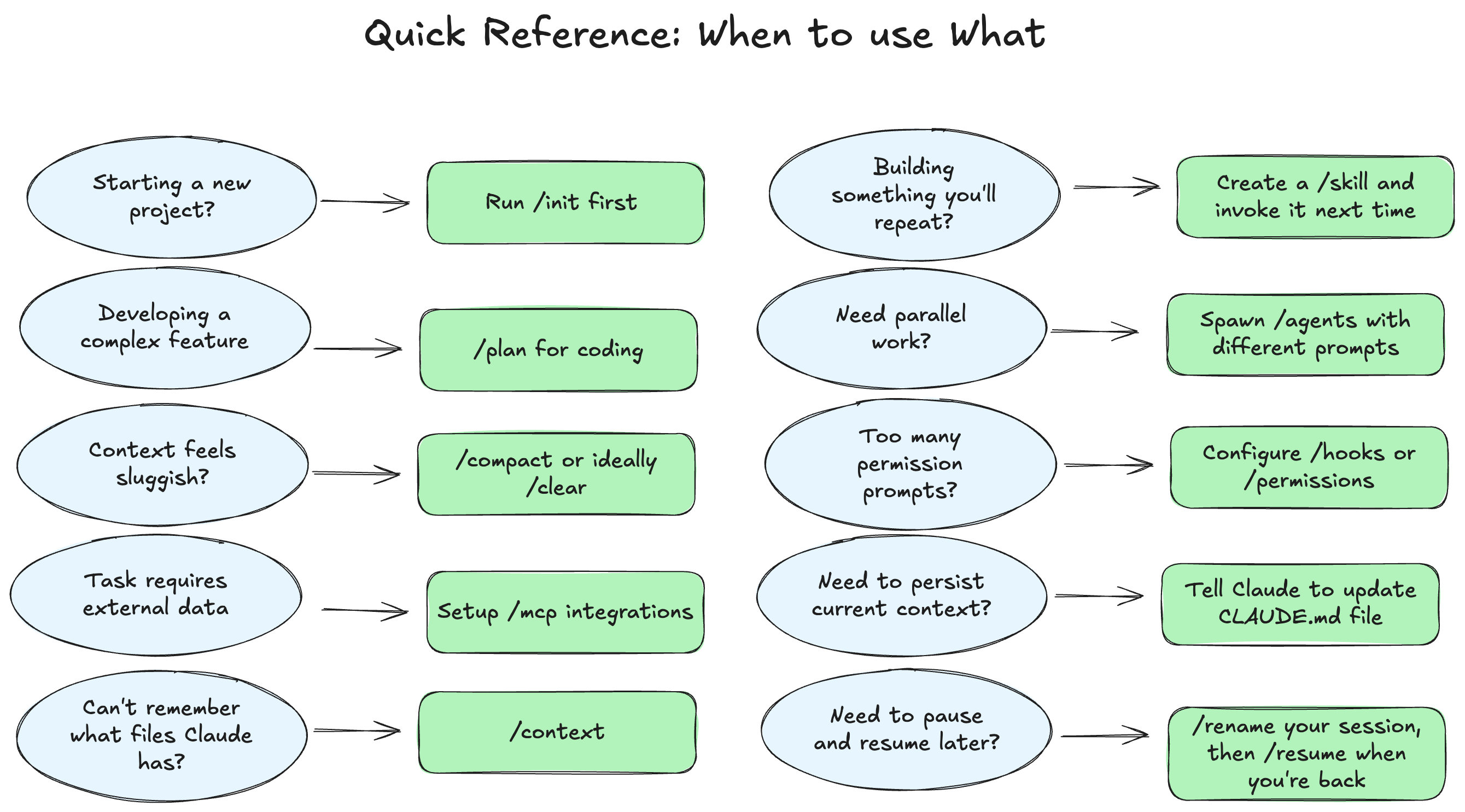
Here’s a quick reference on when to use what with Claude Code.
For further reading, check out: https://code.claude.com/docs/en/best-practices
If you found this post useful, make sure to subscribe and share with a friend.
Solid rundown. The tip about starting fresh sessions when quality degrades is the one that makes the biggest difference in practice. I'd add that compact (/compact) is worth trying before starting completely fresh — it summarises the conversation so far and buys you more room without losing all your context.
Really well written. Even though this is aimed at technical folks, it's simple enough for anyone to follow